How to use BIM: IFC Model Review and Quantities / طريقة استخدام BIM: مراجعة نماذج IFC والكميات
Open IFC models in the browser, explore storeys and categories, read element properties, compare two files, and extract and check quantities (QTO) to Excel.
افتح نماذج IFC في المتصفح، وتصفح الطوابق والفئات، واقرأ خصائص العناصر، وقارن ملفين، واستخرج الكميات وراجعها (QTO) إلى Excel.
Feature status: · حالة الميزة: Working · يعملPartial / experimental · جزئي / تجريبيNot available yet · غير متاح بعدKnown issue · مشكلة معروفة
What it is for · الغرض من الأداة
IFC Model Review is for looking at a model: navigate it in 3D, hide categories, cut a horizontal section and read the properties of any element. BIM Workflow is for numbers: audit the IFC, extract quantities, cross-check them against the geometry and export a report.
أداة IFC Model Review لاستعراض النموذج: التنقل ثلاثي الأبعاد وإخفاء الفئات وعمل مقطع أفقي وقراءة خصائص أي عنصر. أما BIM Workflow فللأرقام: تدقيق ملف IFC واستخراج الكميات ومطابقتها مع الهندسة وتصدير تقرير.
Both tools are view-only and run in your browser with the web-ifc engine; the model is not uploaded or changed.
الأداتان للعرض فقط وتعملان في متصفحك بمحرك web-ifc؛ لا يُرفع النموذج ولا يُعدَّل.
Inputs and supported formats · المدخلات والصيغ المدعومة
IFC2x3 and IFC4 files exported from Revit, ArchiCAD, Tekla and other BIM tools. Metric and millimetre units are converted.
ملفات IFC2x3 وIFC4 المصدرة من Revit وArchiCAD وTekla وغيرها. تُحوَّل الوحدات المترية والمليمترية.
Not read directly. Export to IFC from Revit or Navisworks first.
لا تُقرأ مباشرة. صدّرها إلى IFC من Revit أو Navisworks أولاً.
The COMPARE tab of IFC Model Review compares two files of these types.
تبويب COMPARE في IFC Model Review يقارن ملفين من هذه الأنواع.
IFC Model Review (/bim-3d-viewer/) · مراجعة نموذج IFC (/bim-3d-viewer/)
Tabs: MODEL, REVIEW and COMPARE.
التبويبات: MODEL وREVIEW وCOMPARE.
Open the model
افتح النموذج
Click Open IFC and choose the .ifc file. Model Information shows the element, storey and mesh counts and the IFC schema.
اضغط Open IFC واختر ملف .ifc. تعرض Model Information عدد العناصر والطوابق والأشكال ونسخة IFC.
Navigate
تنقّل
Drag to orbit, wheel to zoom. Toolbar: Orbit, Fit, Z Up, Wireframe, Isolate and Show all. Save viewport image downloads a PNG of the current view.
اسحب للدوران والعجلة للتكبير. شريط الأدوات: Orbit وFit وZ Up وWireframe وIsolate وShow all. وSave viewport image ينزّل صورة PNG للعرض الحالي.
Explore and filter
تصفح وصفِّ
Project Explorer lists elements by storey. Category Visibility hides walls, slabs, doors and so on. The Horizontal Section slider cuts the model at a height to look inside.
يعرض Project Explorer العناصر حسب الطابق. وCategory Visibility يخفي الجدران والبلاطات والأبواب وغيرها. وشريط Horizontal Section يقطع النموذج عند ارتفاع معين لرؤية الداخل.
Read properties
اقرأ الخصائص
Click an element to see its IFC class, GlobalId, name and property sets in Selected Properties.
اضغط عنصراً لرؤية فئة IFC والمعرف GlobalId والاسم ومجموعات الخصائص في Selected Properties.
Compare two files
قارن ملفين
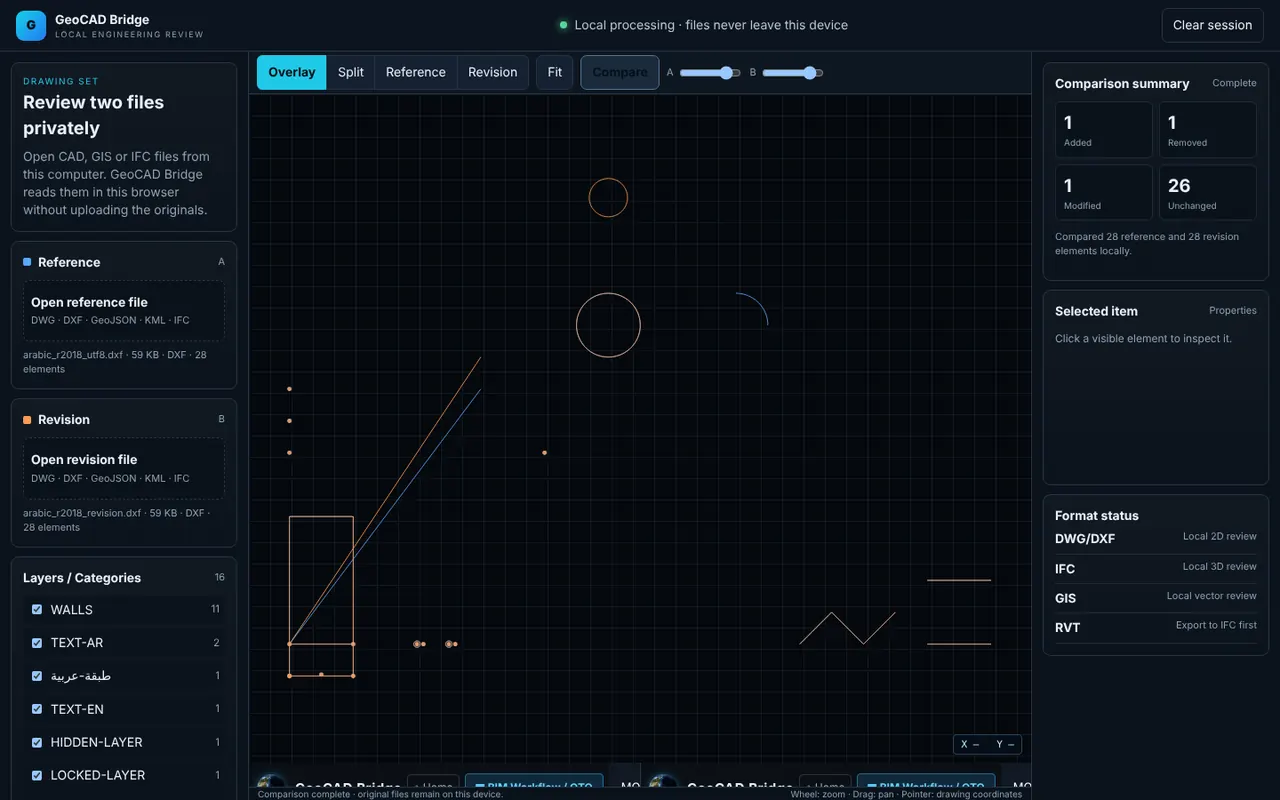
COMPARE: load a Reference and a Revision file (DWG, DXF, GeoJSON, KML or IFC), then Compare. View them as Overlay or Split, and read the counts of added, removed, modified and unchanged items.
COMPARE: حمّل ملف Reference وملف Revision (DWG أو DXF أو GeoJSON أو KML أو IFC) ثم Compare. اعرضهما Overlay أو Split واقرأ أعداد العناصر المضافة والمحذوفة والمعدلة وغير المتغيرة.
BIM Workflow and QTO (/bim-workflow/) · سير عمل BIM والكميات (/bim-workflow/)
An 8-step pipeline: Import, Validate, Visualize, Extract QTO, Review, Geometry, Compare, Report.
مسار من ٨ خطوات: Import وValidate وVisualize وExtract QTO وReview وGeometry وCompare وReport.
Import
استورد
New Project, then Import IFC.
New Project ثم Import IFC.
Audit
دقّق
▶ Run IFC Audit counts the elements by IFC class and storey so you can see what the model contains before taking quantities.
▶ Run IFC Audit يعد العناصر حسب فئة IFC والطابق لتعرف محتوى النموذج قبل حصر الكميات.
Calculate quantities
احسب الكميات
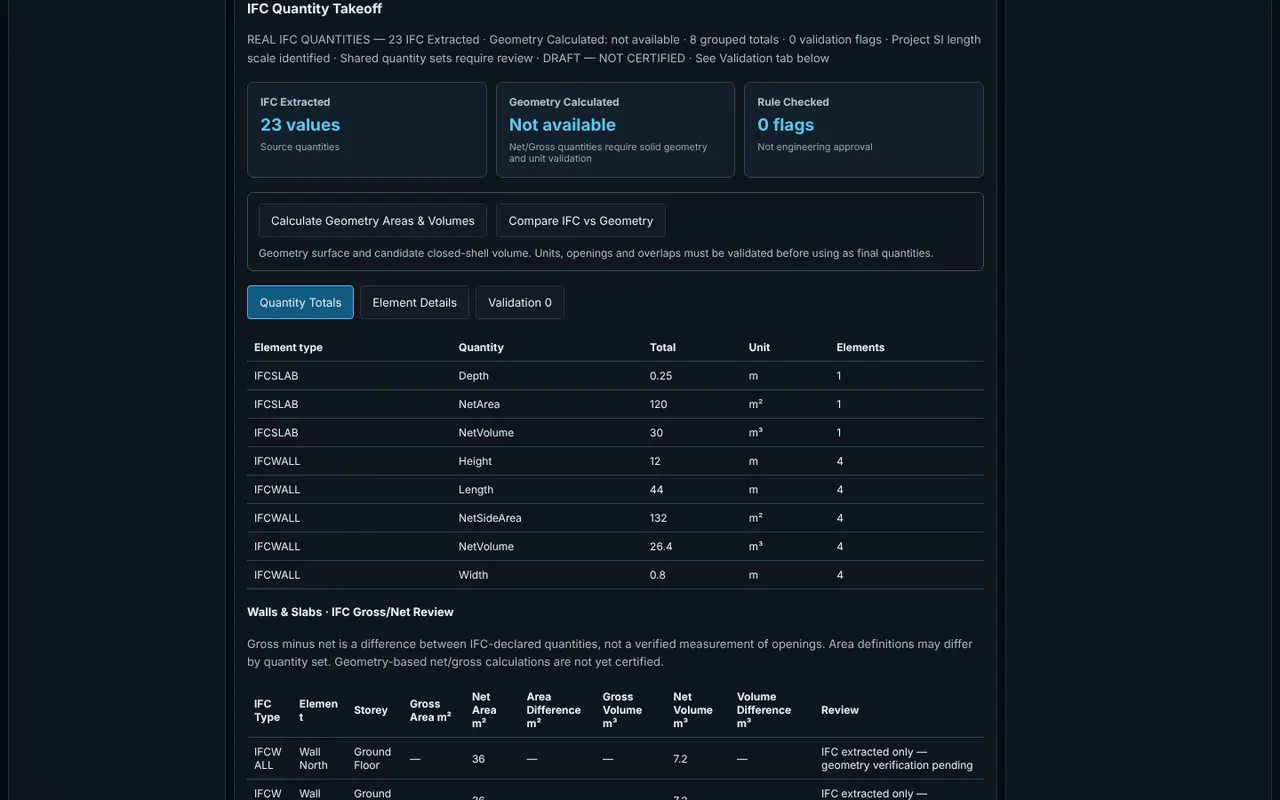
▦ Calculate Quantities reads the IFC quantity sets (length m, area m², volume m³). Calculate Geometry Areas & Volumes measures the meshes, and Compare IFC vs Geometry shows where they disagree. Tabs: Quantity Totals, Element Details, Validation; walls and slabs have a Gross/Net review.
▦ Calculate Quantities يقرأ مجموعات الكميات في IFC (الطول م والمساحة م² والحجم م³). وCalculate Geometry Areas & Volumes يقيس الأشكال، وCompare IFC vs Geometry يوضح مواضع الاختلاف. التبويبات: Quantity Totals وElement Details وValidation؛ وللجدران والبلاطات مراجعة Gross/Net.
Export
صدّر
↓ Export Excel (.xlsx), or choose the report format (JSON audit or CSV element summary) and Download Audit Report.
↓ Export Excel (.xlsx)، أو اختر صيغة التقرير (JSON audit أو CSV element summary) ثم Download Audit Report.
Buttons, tabs and commands · الأزرار والتبويبات والأوامر
Open and navigate the model.
فتح النموذج والتنقل فيه.
Explore and inspect.
التصفح والفحص.
Audit and quantity takeoff.
التدقيق وحصر الكميات.
Shortcuts to each step.
اختصارات لكل خطوة.
Outputs · المخرجات
Quantity totals and element details.
إجمالي الكميات وتفاصيل العناصر.
Audit report and element summary.
تقرير التدقيق وملخص العناصر.
Viewport image from IFC Model Review.
صورة العرض من IFC Model Review.
Practical example · مثال عملي
Example: concrete quantities for a villa
مثال: كميات الخرسانة لفيلا
BIM Workflow → New Project → Import IFC → Villa.ifc (exported from Revit with "Export base quantities" ticked).
BIM Workflow ← New Project ← Import IFC ← Villa.ifc (مُصدَّر من Revit مع تفعيل «Export base quantities»).
▶ Run IFC Audit: confirm the wall and slab counts per storey match the drawings.
▶ Run IFC Audit: تأكد أن عدد الجدران والبلاطات في كل طابق يطابق المخططات.
▦ Calculate Quantities, then Calculate Geometry Areas & Volumes and Compare IFC vs Geometry. Investigate any slab whose IFC volume differs from the geometry.
▦ Calculate Quantities، ثم Calculate Geometry Areas & Volumes وCompare IFC vs Geometry. افحص أي بلاطة يختلف حجمها في IFC عن الهندسة.
↓ Export Excel and use the IfcSlab and IfcWall volumes (m³) as a check on the BOQ.
↓ Export Excel واستخدم أحجام IfcSlab وIfcWall (م³) للتحقق من جدول الكميات.
Limitations · القيود
- Partial / experimental · جزئي / تجريبي
Quantities are marked "DRAFT — NOT CERTIFIED". They are only as good as the IFC export: if the authoring tool did not write quantity sets, use the geometry quantities and check them.
الكميات موسومة «DRAFT — NOT CERTIFIED». دقتها تعتمد على تصدير IFC: إذا لم يكتب برنامج التصميم مجموعات الكميات فاستخدم الكميات الهندسية وراجعها.
- Not available yet · غير متاح بعد
Interactive 3D editing and clash detection are planned and not available.
التعديل ثلاثي الأبعاد التفاعلي وكشف التعارضات مخطط لهما وغير متاحين.
- Not available yet · غير متاح بعد
Native Revit (.rvt) and Navisworks files cannot be opened; export them to IFC.
لا يمكن فتح ملفات Revit (.rvt) وNavisworks الأصلية؛ صدّرها إلى IFC.
- Partial / experimental · جزئي / تجريبي
Very large models (hundreds of MB) can exhaust browser memory. Split by storey or discipline when exporting.
النماذج الكبيرة جداً (مئات الميجابايت) قد تستنفد ذاكرة المتصفح. قسّمها حسب الطابق أو التخصص عند التصدير.
Troubleshooting · حل المشكلات
Lengths are 1000 times too small or too large
الأطوال أصغر أو أكبر ١٠٠٠ مرة
The IFC unit assignment is wrong in the export. Re-export with the project units set correctly (metres or millimetres).
تعيين الوحدات في ملف IFC خاطئ. أعد التصدير مع ضبط وحدات المشروع بشكل صحيح (متر أو مليمتر).
Quantity columns are empty
أعمدة الكميات فارغة
The IFC has no base quantities. Re-export with base quantities, or use Calculate Geometry Areas & Volumes.
لا يحتوي ملف IFC على كميات أساسية. أعد التصدير مع الكميات الأساسية أو استخدم Calculate Geometry Areas & Volumes.
The model shows as a white or empty view
النموذج يظهر أبيض أو فارغاً
Click Fit and try Z Up; some exports use a different up axis.
اضغط Fit وجرّب Z Up؛ بعض الملفات تستخدم محوراً رأسياً مختلفاً.
Tips and common mistakes · نصائح وأخطاء شائعة
Use Isolate on a single storey before reading properties in a busy model.
استخدم Isolate على طابق واحد قبل قراءة الخصائص في نموذج مزدحم.
Need more help? Send us a message from the Support page.
تحتاج مساعدة أكثر؟ أرسل لنا رسالة من صفحة الدعم.
Last updated 2026-10-24 · آخر تحديث 2026-10-24