How to use 3D KMZ Builder / طريقة استخدام منشئ KMZ ثلاثي الأبعاد
Turn 2D building footprints from CAD or GIS into extruded 3D models for Google Earth, with height, colour and transparency per layer.
حوّل مساقط المباني ثنائية الأبعاد من CAD أو GIS إلى نماذج ثلاثية الأبعاد بارزة لـGoogle Earth، مع الارتفاع واللون والشفافية لكل طبقة.
Feature status: · حالة الميزة: Working · يعملPartial / experimental · جزئي / تجريبيNot available yet · غير متاح بعدKnown issue · مشكلة معروفة
What it is for · الغرض من الأداة
Use the 3D KMZ Builder to show a master plan, a plot layout or a building massing study in Google Earth for clients and presentations, without a 3D modelling program.
استخدم منشئ KMZ ثلاثي الأبعاد لعرض مخطط عام أو تقسيم أراضٍ أو دراسة كتل المباني في Google Earth للعملاء والعروض، دون برنامج نمذجة ثلاثية الأبعاد.
Two modes: Layer-Based 3D Modeling (?mode=layers) gives each layer its own shape and height; Classic Building Builder (?mode=classic) applies one set of building settings to all footprints.
وضعان: Layer-Based 3D Modeling (?mode=layers) يعطي كل طبقة شكلها وارتفاعها؛ وClassic Building Builder (?mode=classic) يطبق إعدادات مبنى واحدة على كل المساقط.
Inputs and supported formats · المدخلات والصيغ المدعومة
Closed polylines as footprints. CAD files must be in metres; choose the UTM zone and hemisphere.
الخطوط المتعددة المغلقة كمساقط. يجب أن تكون ملفات CAD بالمتر؛ واختر نطاق UTM ونصف الكرة.
Polygons in WGS 84.
مضلعات بنظام WGS 84.
Not accepted directly: convert to GeoJSON or KMZ first (SHP → GeoJSON).
لا يُقبل مباشرة: حوّله أولاً إلى GeoJSON أو KMZ (SHP ← GeoJSON).
Step by step · خطوة بخطوة
Load the footprints
حمّل المساقط
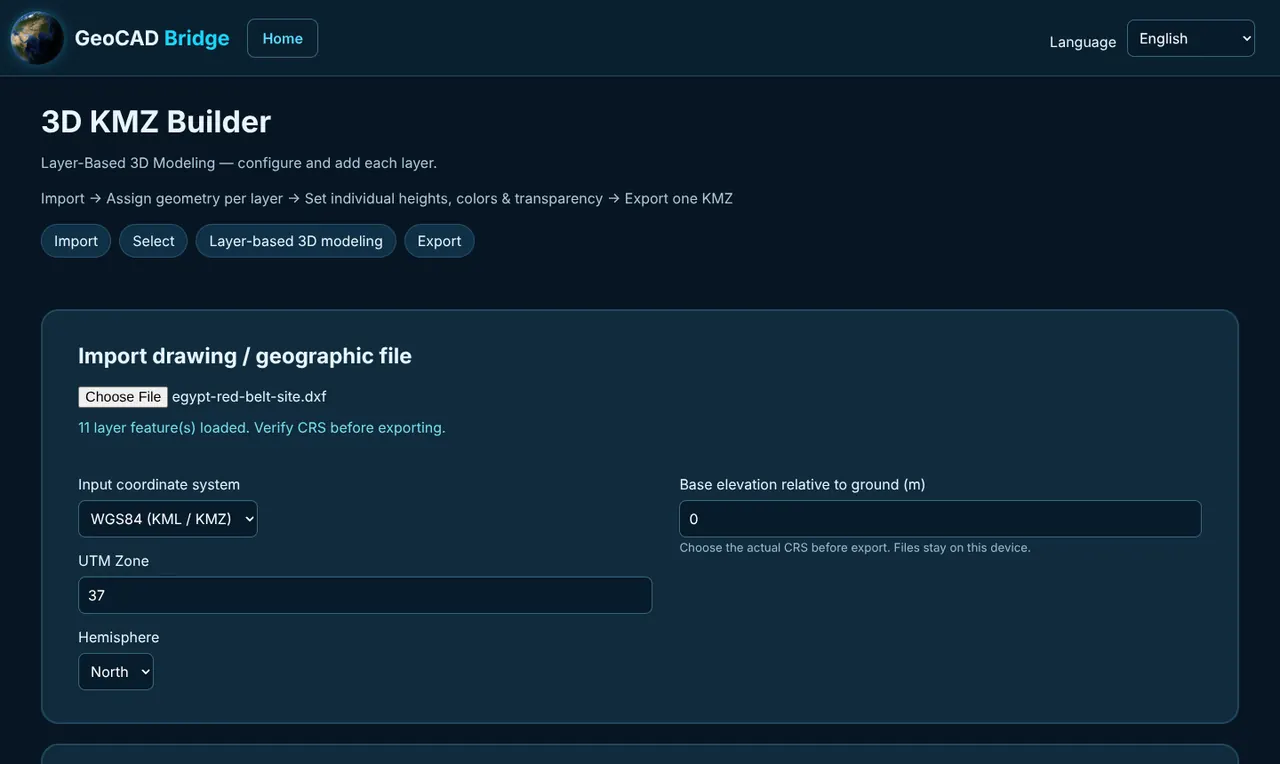
Choose the file. For DWG/DXF set Input CRS to UTM with the zone and hemisphere; for KML/KMZ/GeoJSON keep WGS 84. Base elevation is measured above the ground (0 = on the ground).
اختر الملف. لملفات DWG/DXF اضبط Input CRS على UTM مع النطاق ونصف الكرة؛ ولملفات KML/KMZ/GeoJSON اترك WGS 84. منسوب القاعدة يُقاس فوق سطح الأرض (0 = على الأرض).
Choose layers
اختر الطبقات
Tick the layers to build; Select all / Select none help with large drawings.
حدّد الطبقات المطلوب بناؤها؛ وتساعد Select all / Select none في الرسومات الكبيرة.
Configure the buildings
اضبط المباني
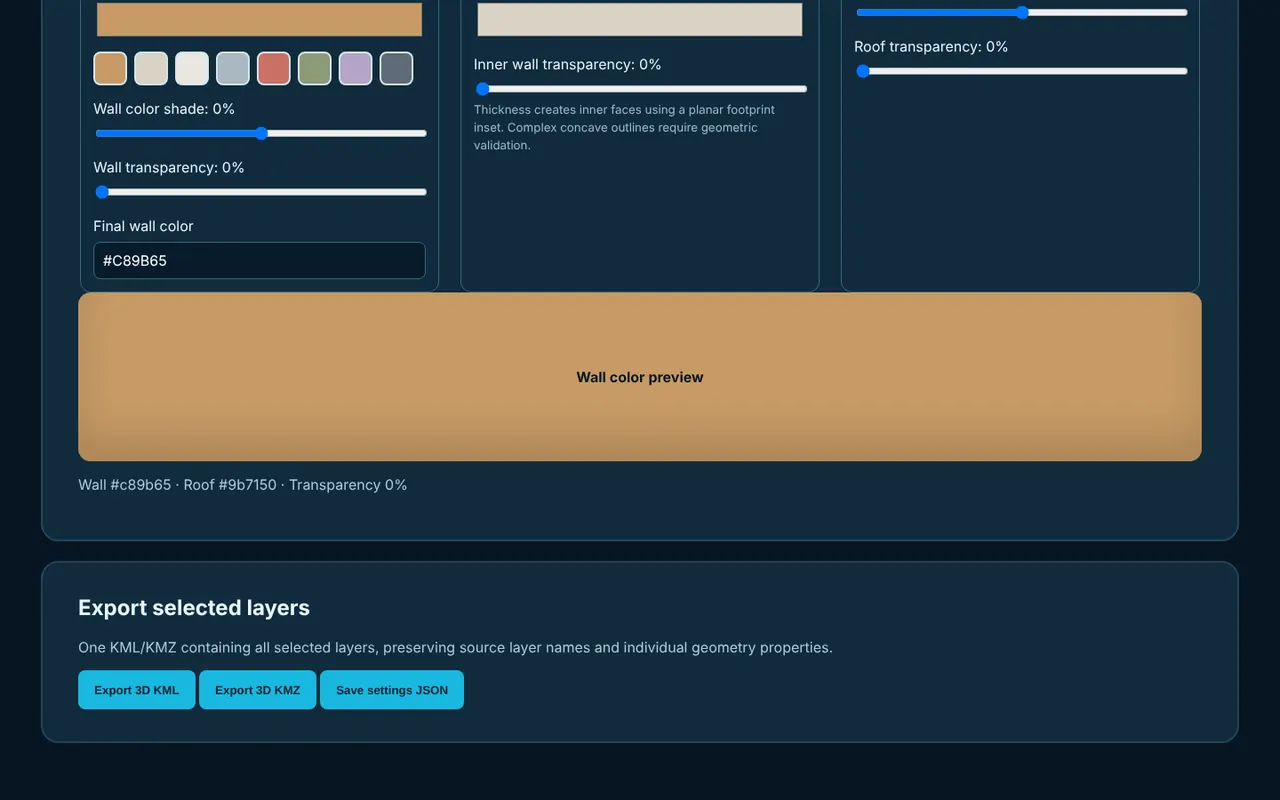
For each layer set the geometry (Extrusion/Building, Dome, Cylinder, Cone or Roof), base elevation, height, colour and transparency, then Add layer. In Classic mode the settings are shared.
لكل طبقة حدّد الشكل (Extrusion/Building أو Dome أو Cylinder أو Cone أو Roof) ومنسوب القاعدة والارتفاع واللون والشفافية، ثم Add layer. في الوضع الكلاسيكي تكون الإعدادات مشتركة.
Preview
عاين
Use Fit View to frame the model in the preview.
استخدم Fit View لعرض النموذج في المعاينة.
Export
صدّر
Export 3D KMZ (or 3D KML) and open it in Google Earth. Save settings JSON keeps your layer configuration for next time.
Export 3D KMZ (أو 3D KML) وافتحه في Google Earth. وSave settings JSON يحفظ إعدادات الطبقات للمرة القادمة.
Buttons, tabs and commands · الأزرار والتبويبات والأوامر
Where the footprints are.
موقع المساقط.
How each layer is extruded.
طريقة بروز كل طبقة.
Preview and export.
المعاينة والتصدير.
Outputs · المخرجات
3D shapes placed relative to the ground, with colour and transparency, for Google Earth (file name like geocad-layer-model-3d.kmz). Open lines are exported as coloured lines.
أشكال ثلاثية الأبعاد منسوبة إلى سطح الأرض مع اللون والشفافية لـGoogle Earth (اسم ملف مثل geocad-layer-model-3d.kmz). الخطوط المفتوحة تُصدَّر كخطوط ملونة.
Your layer configuration.
إعدادات الطبقات.
Practical example · مثال عملي
Example: residential compound massing
مثال: كتل مجمع سكني
Open the compound DXF (UTM 38N, metres). Input CRS UTM, zone 38, North; base elevation 0 m (on the ground).
افتح ملف DXF للمجمع (UTM 38N بالمتر). Input CRS = UTM، النطاق 38، شمال؛ ومنسوب القاعدة 0 م (على الأرض).
Layer VILLAS: Extrusion, height 9 m, beige, 0% transparency. Layer MOSQUE-DOME: Dome, height 6 m on base elevation 10 m (top of the prayer hall). Layer GREEN: Extrusion 0.2 m, green, 30% transparency.
طبقة VILLAS: Extrusion بارتفاع 9 م ولون بيج وشفافية 0%. طبقة MOSQUE-DOME: Dome بارتفاع 6 م على منسوب قاعدة 10 م (سطح المصلى). طبقة GREEN: Extrusion بارتفاع 0.2 م ولون أخضر وشفافية 30%.
Export 3D KMZ and send it to the client to open in Google Earth.
Export 3D KMZ وأرسله للعميل لفتحه في Google Earth.
Limitations · القيود
- Partial / experimental · جزئي / تجريبي
Models are simple massing shapes, not detailed architecture; footprints must be closed polylines or polygons.
النماذج أشكال كتلية بسيطة وليست معمارية تفصيلية؛ ويجب أن تكون المساقط خطوطاً مغلقة أو مضلعات.
- Partial / experimental · جزئي / تجريبي
CAD input supports UTM in metres only. For other national grids, convert to KMZ first with a file converter.
إدخال CAD يدعم UTM بالمتر فقط. للشبكات الوطنية الأخرى حوّل إلى KMZ أولاً بأحد المحولات.
Troubleshooting · حل المشكلات
Buildings appear in the wrong country
المباني تظهر في دولة أخرى
The UTM zone or hemisphere is wrong, or the CAD file is not in UTM metres.
نطاق UTM أو نصف الكرة خاطئ، أو ملف CAD ليس بإحداثيات UTM بالمتر.
Buildings float or sink in Google Earth
المباني تطفو أو تغوص في Google Earth
Base elevation is above the ground, not above sea level. Use 0 for buildings standing on the ground; use the roof height of the lower part for stacked shapes such as domes.
منسوب القاعدة فوق سطح الأرض وليس فوق مستوى سطح البحر. استخدم 0 للمباني القائمة على الأرض، واستخدم ارتفاع سطح الجزء السفلي للأشكال المتراكبة مثل القباب.
A layer is missing from the model
طبقة غير موجودة في النموذج
Check the layer is ticked and was added with Add layer. Buildings need closed polylines or polygons; open lines come out as lines only.
تأكد أن الطبقة محددة وأُضيفت بزر Add layer. المباني تحتاج خطوطاً مغلقة أو مضلعات؛ والخطوط المفتوحة تخرج كخطوط فقط.
Need more help? Send us a message from the Support page.
تحتاج مساعدة أكثر؟ أرسل لنا رسالة من صفحة الدعم.
Last updated 2026-10-24 · آخر تحديث 2026-10-24